 |
Date/Time | Activity | Location | Details | |||||||||||
| Jun 7, 2006 | 2:18 AM |
Int’l shipment release
|
INDIANAPOLIS, IN |
|
|||||||||||
| Jun 6, 2006 | 2:02 PM |
Departed FedEx location
|
ANCHORAGE, AK |
|
|||||||||||
| 12:48 PM |
Arrived at FedEx location
|
ANCHORAGE, AK |
|
||||||||||||
| 11:04 AM |
Left origin
|
SHANGHAI CN |
|
||||||||||||
| 11:02 AM |
Picked up
|
SHANGHAI CN |
|
||||||||||||
| 8:55 AM |
Package data transmitted to FedEx
|
|
|||||||||||||
Categories
World Cup starting to heat up
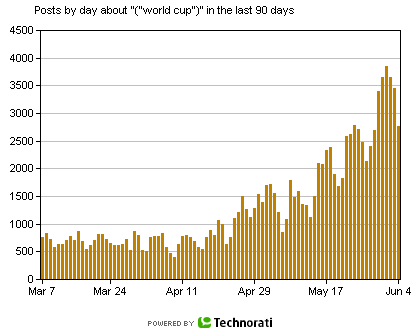
A quick check of the Technorati top searches reveals World Cup News is starting to heat up in the blogosphere. Less than a week away from the first games and we can already see a steady increase in the *noise*. Take a look at the graph below to see just how often the World Cup is showing up in the news. The blogosphere now more than ever can provide a real-time look into what is hot or going to be hot in the near future. Yahoo has partnered with FIFA to build an official World Cup New site. You can even use tools like Google Desktop to get live World Cup New Updates live.
The wait is over. I’ve decided to order my MacBook Pro. See the details below. Lenovo decided to drop Linux as a focus for the Thinkpad line. The lack of a well supported Linux/Unix distro further adds reason to move to Mac.
|
Order Details |
|||||
|
Product Name |
Product Number |
Unit Price |
Qty |
Subtotal |
|
 |
|||||
|
MBPRO 15/2.16 CTO |
Z0DL |
$2,899.00 |
1 |
$2,899.00 |
|
|
With the following configuration:
|
|||||
|
Estimated Shipped By: |
JUN 07, 2006 |
||||
|
Estimated Delivered By: |
JUN 12, 2006 |
||||
|
Recycle Fee |
$8.00 |
1 |
$8.00 |
||
|
APPLE PORTABLE POWER ADAPTER85WUSA |
MA357LL/A |
$79.00 |
1 |
$79.00 |
|
|
Estimated Shipped By: |
JUN 05, 2006 |
||||
|
Estimated Delivered By: |
JUN 07, 2006 |
||||
Well the 17″ MacBook Pro’s are starting to arrive. From the reports I’ve read the 17″ MBP lack the whine which appears in many of the early production 15.4″ MacBook Pro models. There are a few things that are popping up for the first time. Like the lid stays closed better, staying cooler and then there are those who think the 17 inch MBP is still stupid big. Hey what’s to lose… you get more for your money than with the 15″. Not to mention an extra 2 inches to help let all the heat out. Personally not sure how much fun it will be to travel with what amounts to a surf board of a laptop. I think it’s clear that the Thinkpad is out. Going to be either a 17″ or 15″ MacBook Pro. Few more mentions.
Apple released the 17″ MacBook Pro last Monday. In Part I of my Apple vs Thinkpad post I mentioned a few reasons why I’m strongly considering the MacBook Pro. The 17″ model adds Firewire 800, 8x super Drive, and obviously a larger screen. If Apple had just added the option for a speed bump in the Core Duo it may have just been the tipping point.
On a side note the MacBook Pro is seeing more and more applications get ported to native Intel and/or Universal support. Just one more feather in the MacBook’s hat.
Categories
Top Firefox Extensions
Firefox is a very extensible browser. Here’s a list of top Firefox extensions. These are the Firefox browser extensions that are most popular and have the highest number of downloads. Download your favorite today.
Download Firefox Top Extensions
* FlashGot
* NoScript
* Fasterfox
* Tab Browser
* IE Tab
* Forecastfox
* Tab Mix Plus
* Filterset.G Updater
* downTHEMall!
* StumbleUpon
For more information on Firefox and to search for additional extensions goto https://addons.mozilla.org/firefox/extensions/
On an internet filled with spyware Mozilla Firefox is looking out for you. Its built in popup blocker makes sure you aren’t bothered by annoying and explicit popups while you surf the web. Mozilla Firefox has also been shown to be far less at risk to Spyware. If you are using a different browser and are concerned about your safety online, and the security of your personal information and computer then you should download Firefox immediately and see the difference it makes. Firefox also has a built in updater that notifies you once updates for Firefox become available. Downloading these updates is quick and simple, and immediately your browser has been updated and the known vulnerabilities have been fixed.
Download Firefox for Customizability
Mozilla Firefox is the most customizable browser to date. The look and feel of Firefox can be set to match the theme of your computer, or to anything you wish with Firefox Themes. Why settle for having your browser looking the same as any other boring old program? Make your desktop and browser unique by choosing a theme that fits you, arrange the toolbars however they work best for you, and fine tune your settings to get Firefox running exactly how you want it. Customizing Mozilla Firefox is fun, easy, and makes your life that much better.
I’ve been an IBM Thinkpad user for the last ~7 years. By and large they’ve been good to me. I think in those 7 years I’ve had 6 different Thinkpads. On average one a year. Only two failures to speak of; the first a hard drive failure on my T20 which had been whining for weeks so I had good backups. The 2nd a screen failure when an airport screener (one of those new anal post-9/11 types) dropped it taking it over to the bomb residue tester. So for 7 years of heavy laptop use not a bad record. However more and more I’ve got my eye on making the switch to Apple. Thinking back; my first ever computer that I did any *real* work on was an Apple IIe. Wrote some LOGO programs in an after school computer class.
Today my first reason to consider the Mac is that my day-to-day work can all be done(I think) without the support of Windows or Linux as my primary OS. Using Windows as my primary desktop for more than a decade has I’m sure left some scars. However most of what I do these days can be moved to just about any modern OS. Let’s see… Web based AJAX email, calendar, and contacts client. Thunderbird for offline IMAP mail. IDEA for software development. Firefox for web programming and surf’n the net. FTP, SSH, WinZip, etc. Lots of little productivity tools that can be replace in any OS. So for the most part being internet connected a bulk of the time let’s me do most things on the web.
The second reason is a common one echoed by geeks around the blog-sphere and the net. OSX is more secure, it’s Unix, it s *real OS*, it’s got nice UI candy, yadda yadda yadda. Nothing new there but for the most part I agree. The third and key factor is that Mac laptops have finally caught up speed wise with Apple’s switch to the Intel chips. For years the even the highest end Apple laptops suffered severe lags in performance compared to their IBM counterparts. For a developer or someone who uses a laptop for more than just a word processor and internet kiosk this is a huge deal. Before the MacBook Pro it just wasn’t feasible to use a Mac laptop as your primary machine if you wanted to get the most performance. The forth and final reason I’ve identified is that in my space and geek space in general an Apple is just cooler than a Windows machine. Ok so this is hard to prove and it’s a bit of a religious topic but I had to add it. So with that my delima begins. To Mac or not to Mac? Stick with Thinkpad and the new Core Duo T60’s or leave IBM (ahem.. Levono) behind and take the plunge with MacBook Pro?
I’m obviously not the only person looking at this issue.
What do you think?
Categories
Firefox Lead To Join Opera
Well Asa has decided to take a job with Firefox rival Opera…………………………… Just after his don’t be a fool post. Nice one!
Categories
New Toy – Panasonic 42" Plasma
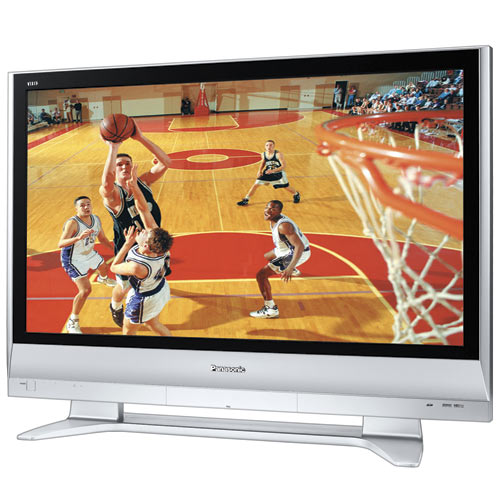
Panasonic 42″ Diagonal Plasma HDTV with Built-In ATSC/QAM/NTSC Tuners and SD Memory Card Slot
Deep Blacks, Bright Whites, and 29 Billion Colors
The realism of a TV’s image is strongly linked to its contrast ratio, and this plasma features a high contrast ratio of up to 10,000:12. Such a wide range from black to white means great depth and dimensionality with vibrant colorsand this plasma can display an incredible 29 billion colors for a superior picture. Deep blacks provide excellent shadow detail during dark scenes, while brilliant whites allow our plasmas to render bright scenes with vivid realism.
Categories
Faster DOM Queries
Dean Edwards has posted a demo with a cross browser way of super quick DOM queries.
Limitations
* As described earlier, speed improvements only apply on page load for IE. Further DOM queries will use the original getElementsBySelector function
* the speed of CSS2 queries (attribute selectors) are not improved for IE5/6
* because of the nature of the CSS hack, you can only apply one behavior per element 🙁Conclusion
* DOM queries on Firefox seem pretty quick
* XPath is about 150% faster than DOM queries on a Mozilla platform
* XPath is about 1000% faster than DOM queries on an Opera platform
* the expression hack is about 200-400% faster on an IE platform
* Behaviour leaks like a sieve